
There’s a version of this post that’s just about saving time. That’s part of it, but it’s not really the point.
When our CGI illustrations are submitted as evidence as part of a Planning Application, they serve as a formal assertion. This is what the building will look like, from this position, at this time of day, in this light.
That needs to be right. Not roughly right. Actually right.
So when I started thinking about what Claude AI could usefully do for my pipeline, accuracy was the starting point rather than efficiency.
Scripting
Most professional 3D and rendering applications have had scripting (writing snippets of code to automate boring stuff) capability for decades. 3ds Max has MaxScript, which has been part of the software since the mid-nineties. Blender has Python. Houdini is practically built around the concept.
I did learn to code MaxScript well enough to build a working library of tools over the years. But there are only so many hours in a working day, and the more specialised the requirement, the slower the going. There were always tools I wanted that stayed on the to-do list because the time needed to build them was hard to justify against live project work. Also and more importantly, I’m not very familiar at all with the scripting language Octane uses, which is Lua.
Working with Claude
I’ve written before about using AI to help with coding here. This takes that a step further. Over the past few weeks I’ve been working with Claude to build a suite of scripts, some in MaxScript for 3ds Max, some in Lua for Octane Standalone, that automate the parts of the pipeline where errors are most likely to creep in.
I’m not a coder or developer in any formal sense. But I understand code well enough to work with it. Claude wrote the bulk of what we built. I directed, tested, broke things and refined. Anyone who has recently used a tool such as Claude AI will recognise the ‘back and forth’ nature of this.
The gains aren’t really coming from Claude doing the work. They’re coming from being able to build task-specific tools that didn’t previously exist. Things that remove manual steps and make the right outcome the default, rather than something that depends on remembering to check. The expertise, the judgment, the understanding of what a CGI actually needs to show, that stays with the practitioner.
What changes is how reliably the process supports it.
Camera Positioning
The first tool exports camera data from 3ds Max directly to Octane Standalone. Position, target, field of view. All translated automatically between the two applications, with coordinate system differences and unit conversions handled without manual ( and therefore ‘fat finger’) intervention.
One of my quirks is that I prefer to use 3ds Max for modelling and camera positioning, and then transferring all this across into Octane Standalone for rendering. In practice this meant manually copying and pasting camera coordinates from Max to Octane..
I tend to model things (as most CGI artists do) in centimetres, whereas Octane’s default system units are metres. They also differ in what they consider ‘pointing up to the sky’, with 3ds Max working in what we’d understand with +Z pointing up (similar to the World), and Octane regarding ‘up’ as coming out of the screen at you, or +Y.
When producing photomontaged imagery, the camera used to create the CGI should correspond to a real position on site, established from the backdrop photography. Getting this wrong has obvious consequences for how the proposed building reads in context.
The skills required and responsibility in positioning the camera (in the virtual world) lies with the practitioner, i.e. me and requires some professional judgment (although there are tools to assist with this), and I’ve written about this process here on my Substack page.
Once positioned I would then, as mentioned, reformat the camera’s positioning data within 3ds Max to match Octane’s preference for metres and +Y orientation and then copy and paste each individual bit of data across to a corresponding camera in Octane. I always felt slightly uncomfortable about doing this though (puny humans are prone to error after all), which essentially lead to me musing about whether something like Claude AI could help me create a more systematic set of tools that handled the ‘error free’ export of camera data (to a txt file) from 3ds Max (via MaxScript) and then a straight import (from said txt file) into Octane (via Lua).
So how did it go?
We got there, in the end. I’ve used Claude before for creating MaxScript tools and what’s revealing (and possibly terrifying?) is that Claude learns and teaches itself on the job. I could have written the MaxScript side of things myself, but since I’m paying £20 per month for a Claude Professional subscription, I got Claude to do it, with a nice shiny MaxScript UI (I don’t normally bother with the UI side of things, too much faff). I’m self taught when it comes to coding, Claude is more thorough and robust with nitty-gritty things like built in error handling and so forth.
And yes, it created a nice tool for selecting a camera in the 3ds Max scene and spitting out its coordinates, direction and field of view (in degrees) to an ASCII txt file of your choice, translated into metres and with its ‘up’ direction set to +Y.
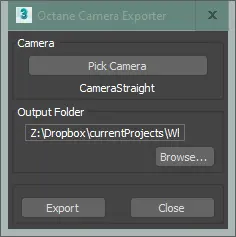
So far so good!
Creating a Lua script to import the data for and create a corresponding camera within Octane was more involved. I have zero knowledge of coding in Lua, but guessed (correctly) that Claude would, or certainly in its most vanilla and purest form. As it transpired, there was a lot of to-ing and fro-ing, screen-grabbing the error messages that Octane threw up and pasting these back into Claude (Claude can understand pixel images of messages and turn them into plain text, who knew?).
There was a lot of time spent with Claude educating itself about the nuances Octane uses with Lua to describe for example, its definition of a camera, and this was achieved with Claude writing mini diagnostic scripts, which I ran and feedback to Claude. Again, it teaches itself as it goes along (and again, terrifying?).
But ‘we’ got there, it took about an hour or so, and a lot of diagnostic scripts were created on the fly, so Claude could educate itself.
So now I have a less ‘prone to human error’ system for translating camera positions easily between 3ds Max and Octane Standalone.
Encouraged by this, and with in theory Claude armed with a greater understanding of how Lua is integrated within Octane, I started to think about other useful tools I could create.
Solar Positioning
The second tool is where it gets more involved. For a photomontaged CG image we also need to consider the prevailing lighting condition, and if the backdrop photograph was shot on a sunny day (they generally are!), the Sun’s direction and how that affects the shadowing on the proposed development when rendered.
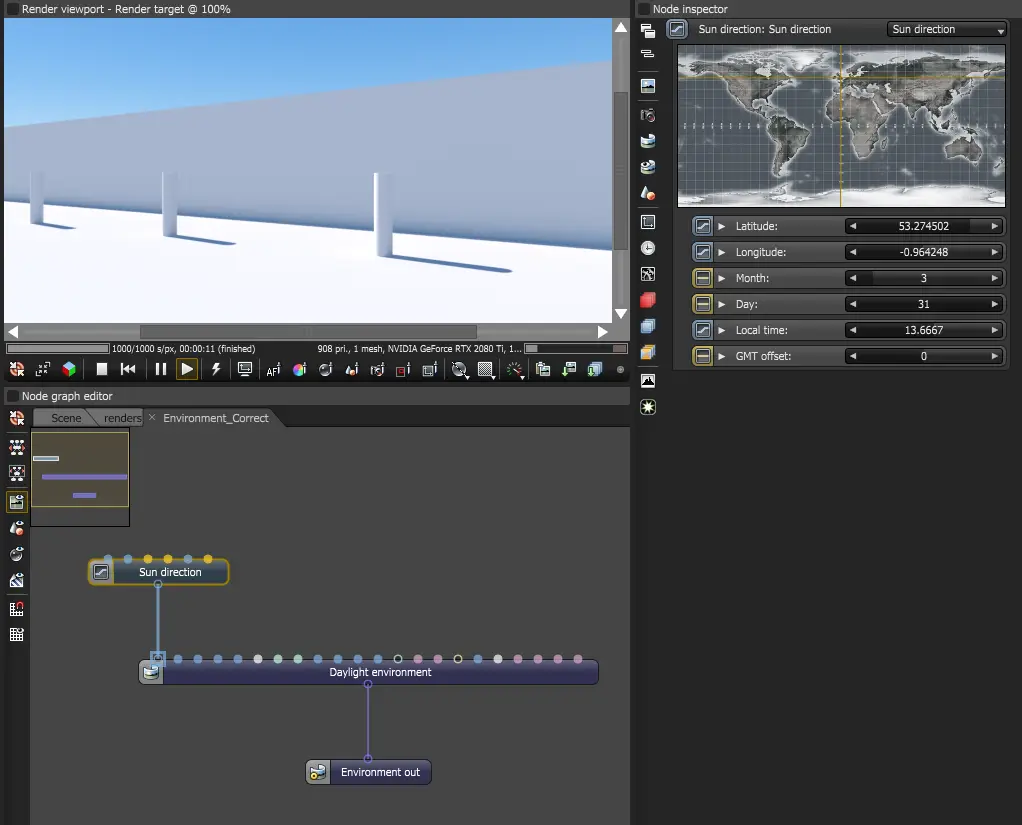
Octane’s ‘daylight environment’ system has a sun direction node that accepts latitude, longitude, date, time and GMT offset (the much maligned ‘British Summer Time’, or not). Feed it the right values and it calculates the correct solar position.
How to establish the longitude, latitude for an existing site?
I plumped for the desktop version of good old Google Earth, where you can pin a location marker to an existing site and export it as a KMZ file.
I had it in the back of my head that Claude could probably unpick this, and indeed Claude confirmed it could, to paraphrase Claude, a ‘KMZ file is essentially a zipped KML file. KML (Keyhole Markup Language) is the XML-based format Google uses to store geographic data — coordinates, placemarks, paths, polygons and so on. Google Earth saves it as KMZ (the compressed version) by default.‘
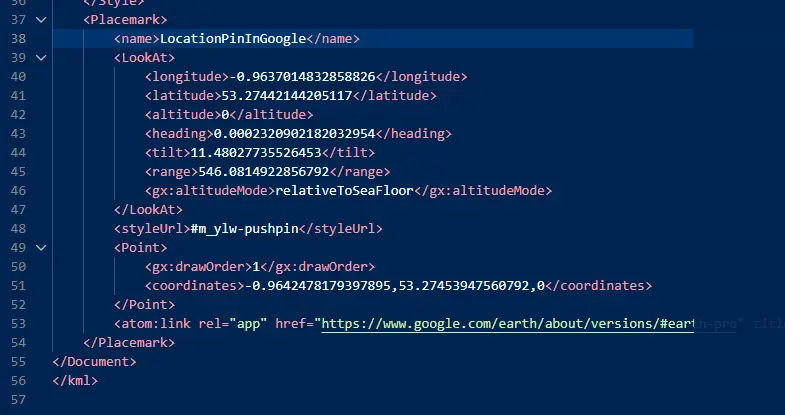
Moving on to date and time, the other parameters required. Well, why not the original backdrop photography, assuming it’s digital photography?
EXIF (Exchangeable Image File Format) is metadata that gets embedded in a photograph at the moment it’s taken. A modern smartphone or camera records a surprising amount of information alongside the actual image — date, time, camera make and model, exposure settings, focal length, and if location services are enabled, the GPS coordinates of where the shot was taken. I decided to stick with the Google Earth KMZ for location, against using the GPS data embedded with the original photo.
Something to consider, not all digital photography has the EXIF metadata embedded, so I decided (or asked Claude rather) to include an option for entering the date and time manually, if needed. And could Claude extract the EXIF metadata from something like a JPEG? Yep!
So, the latitude and longitude come from a KMZ file saved from Google Earth, a pin dropped at the site location. The date and time come from one of two sources: the EXIF data embedded in the backdrop photograph if it was taken on a device with location services enabled, or manual entry if not. British Summer Time (GMT +1) is handled with a simple toggle.
As with the camera positioning exercise, I decided on a hybrid approach of both MaxScript and Lua. (The MaxScript side might be useful for setting up a daylight system within 3ds Max at some point). A MaxScript tool extracts and packages all of this into an ASCII txt file. An Octane Lua script reads it and builds the environment node graph with a daylight node wired and ready to go in Octane. The result is a sun position that corresponds to the actual conditions when the backdrop photograph was taken. Shadow angle and light quality, all from real data!
As before, there was a lot of to-ing and fro-ing, a lot of pasting screen grabs of error messages and at one point Claude went down a blind alley of trying to re-create the sun direction with pure vector arithmetic rather than employing the in-built longitude, latitude system within Octane (???), but ‘we’ got there, in the end.
So Why Bother?
We puny humans know when something feels off. A sun in the wrong position, shadows that don’t match the backdrop. These things undermine confidence in the image and, by extension, in the application.
None of this is new thinking. Accurate sun position and verified camera placement have always been best practice in planning visualisation. What’s changed is the ability to act on that thinking consistently, or rather the opportunity to build tools to enable that readily.
The real value of working with Claude isn’t the specific scripts we built. It’s that things which used to require either a significant time investment or careful manual discipline on every job are now just part of how the pipeline works. The sun position is set correctly because the process sets it correctly. The camera data transfers without transcription errors because the script handles it.
One last thing. I’m not entirely comfortable about the energy cost of running these models (the data centres, the cooling, the infrastructure behind even a simple query), and I don’t think that should be brushed past. I don’t have a tidy answer to it, and for now I use these tools sparingly.
The productivity gains are real. But consistency is the more significant thing, and I can’t ignore it. I guess the optimist in me hopes the energy and resource questions can be solved effectively, no doubt with the assistance of the AI tools themselves.
For now at least, no more ‘fat fingers’ when copying and pasting.